
PolyGun Review: Polymarket Telegram Sniper Bot for Fast Execution
PolyGun review for Polymarket traders: Telegram sniper execution, copy trading features, public fee signals, smart wallets, risks, and when speed actually helps.
PolyGun is the speed-focused Telegram bot in the Polymarket bot stack. It is useful when you already have a signal and need faster execution, but dangerous if you use speed to chase markets after the price already moved.
- Use it when seconds matter and the trade thesis is already done.
- The easy button can turn a missed trade into a bad entry.
- Fee pages disagree, so trust the bot screen only after you check it.
Who should use PolyGun?
PolyGun is not the first bot I would give a beginner. It is for traders who already know why they want a trade and need a faster way to place it from Telegram before the order book changes again.
The public trader material is useful here because it makes the category obvious: PolyGun is for fast market action, not slow due diligence. It talks about smart wallets, sniper entries, sponsored-gas/gasless execution claims, portfolio tracking, PnL cards, AI/volume alerts, and zero-confirmation expert-style speed. That can be powerful. It can also help you click bad ideas faster.
- Use it when seconds matter and the trade thesis is already done.
- The easy button can turn a missed trade into a bad entry.
- Fee pages disagree, so trust the bot screen only after you check it.
What PolyGun does
PolyGun lets users browse markets, buy and sell positions, copy wallets, find smart wallets, place limit orders, track portfolios, deposit, withdraw, and share PnL cards from Telegram. That makes it an execution cockpit, not a research app.
That cockpit framing matters. PolyGun should sit next to a live thesis: a news event, a wallet move, a price level, or a short-duration market where seconds matter. If there is no thesis, the sniper UI is just an expensive dopamine button.
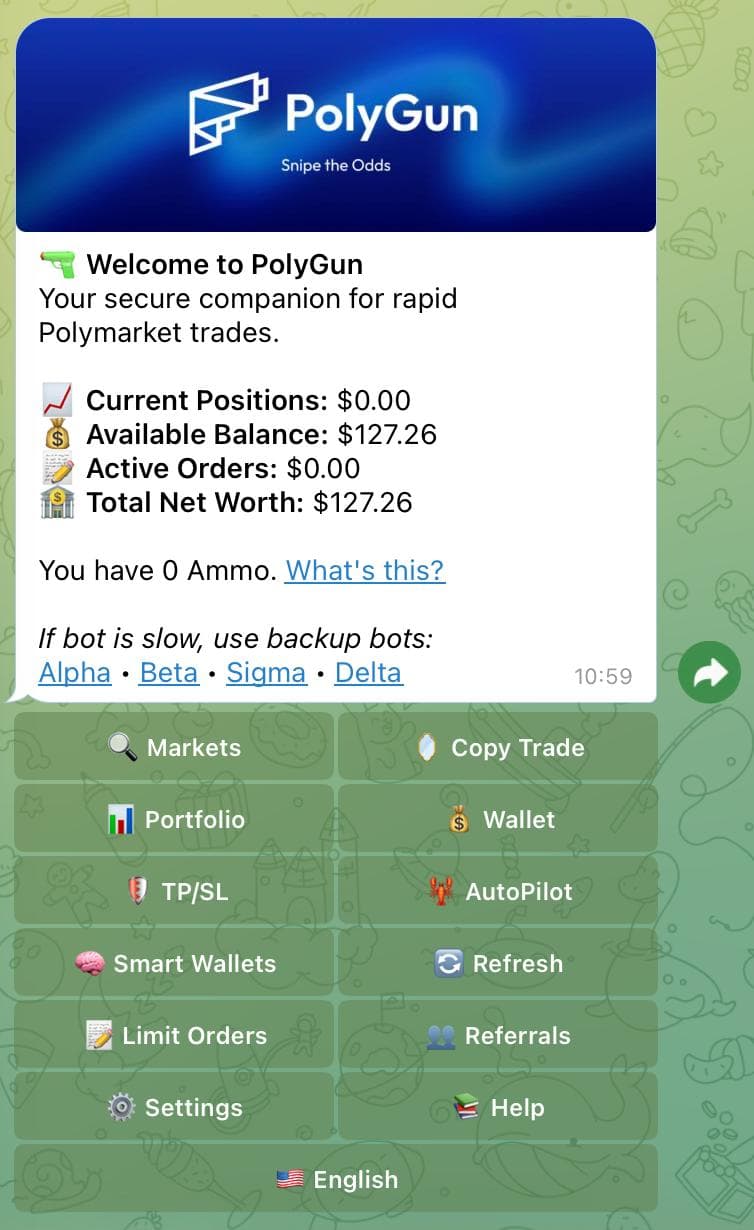
- The screenshot shows a fast-action menu: markets, copy trade, TP/SL, limit orders, smart wallets, wallet tools, and refresh actions.
- That is useful for speed, but speed is only helpful if the signal is still live. The best PolyGun use case is reacting to a thesis you already checked, not panic-buying the first market that flashes green.
Fees, public signals, and field notes
Builder data lists PolyGun at 1% per buy/sell transaction. Other PolyGun-branded pages have conflicting fee language, so confirm the current fee screen inside the bot.
Telegram page showed about 11,326 monthly users when checked. Official site claims include 1,289 daily copy traders and 100+ partners, but those are site claims and should be treated as unverified marketing stats. pm.wiki and PolymarketBots pages exist, but public review volume is thin; treat them as discovery sources, not independent validation.
How I would use PolyGun with Predicts.guru
Use Predicts.guru event analytics first. If spread, liquidity, and price movement still make sense, then use PolyGun for execution. If the trade is already gone, do not let Telegram urgency talk you into a worse entry. A sniper bot should save seconds, not erase discipline.
- Start with a wallet or market thesis on Predicts.guru.
- Check recent PnL, ROI, trade count, position size, liquidity, and whether the price already moved.
- Only then open the bot/tool and start with small sizing.
PolyGun compresses the distance between seeing a signal and placing a trade. That is useful only when the signal is still valid.
- Fee claims vary between PolyGun-branded pages; verify the current fee inside the Telegram bot.
- A sniper bot does not recover a price that already moved.
- Smart-wallet discovery still needs wallet-quality verification.
PolyGun saves seconds. It does not save a trade after the spread widens or the price already moved.
Before using PolyGun, make sure the trade is still there. Speed will not bring back a missed price.
Is PolyGun worth using?
PolyGun is worth testing when seconds matter and you already know the trade you want. If you are using it to chase every market that moves, the speed becomes a liability.
What should I check before using PolyGun?
Check custody, fees, withdrawal flow, permissions, slippage, market liquidity, and whether the wallet or strategy you want to follow has repeatable performance.
The PolyGun link may include a referral code. The review still treats speed as a tool, not as an edge by itself.
Check these official Polymarket sources before you act on referral terms, deposit methods, fees, availability, verification, or resolution details.
Last verified: May 20, 2026
Use PolyGun for fast execution only after the market still checks out.
Verify wallet PnL, ROI, activity, and market history before copying or automating trades.
Tools and related reading referenced by this guide.
Continue with nearby Polymarket research topics.
Compare Polymarket bots for copy trading, Telegram execution, sniper trades, smart-money alerts, mobile trading, terminals, and AI research workflows.
Use the Predicts.guru Polymarket wallet checker to look up trader PnL, open positions, win rate, trading history, and risk patterns.
Learn how to use Polymarket from signup to research, deposits, market selection, Yes/No shares, position tracking, and risk checks.