
Polycule Review: Mobile Telegram Trading and Copy Trading for Polymarket
Polycule review covering Telegram trading, copy trading controls, social features, docs, security incident notes, fees, and risk checks.
Polycule is the mobile/social Telegram trading option. It is interesting for traders who want markets, positions, wallet actions, and group trading inside Telegram, but it needs stricter custody and security checks than a simple alert tool.
- Use it if your trading already lives in Telegram chats.
- Read the docs before using copy settings or group flows.
- Check the audit and incident notes before funding anything.
Who should use Polycule?
Polymarket conversation already happens in chat, so Polycule feels natural. The danger is that chat also creates urgency, group pressure, and a tendency to treat social momentum as analysis.
For Polycule, the strongest angle is mobile/social trading: markets, positions, wallet actions, copy settings, and group flow without leaving Telegram. That can feel natural, but it means the article needs more trust checks than a simple alert-tool review.
- Use it if your trading already lives in Telegram chats.
- Read the docs before using copy settings or group flows.
- Check the audit and incident notes before funding anything.
What Polycule does
Official docs describe trading YES/NO from Telegram, market browsing/search, trending markets, position management, limit orders, price charts, wallet management, Solana-to-Polygon bridging, copy trading, wallet tracking, and group/social trading.
That is a lot of power in one chat interface. The useful version is checking a market in Predicts.guru, then using Polycule because Telegram is where you are already coordinating. The risky version is letting group chat turn every half-formed idea into a position.
- Copy trading docs mention fixed amount, percentage, range-based sizing, copy/counter-trade, liquidity/volume/odds filters, max per market, pause/resume/delete, and strategy sharing.
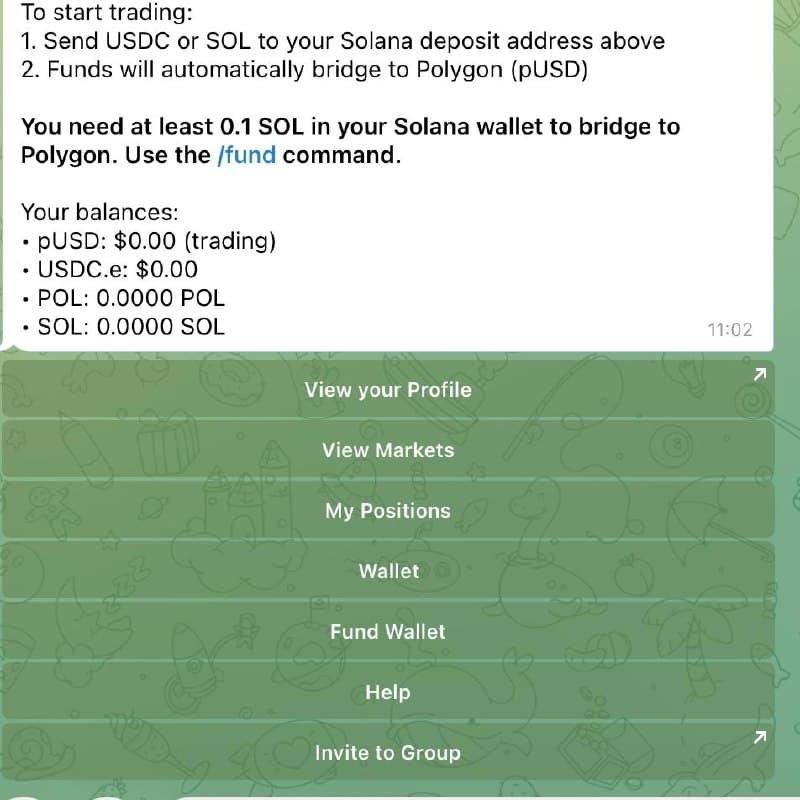
- The screenshot shows a Telegram-style wallet/trading menu with profile, markets, positions, wallet funding, help, and invite actions.
Fees, public signals, and field notes
Builder data marks Polycule trading fee as N/A. Official docs say deBridge charges for Solana-to-Polygon bridging and Polycule collects no added charge on that bridge, but a clear platform trading-fee page was not found in public pages checked.
Telegram page showed about 37,866 monthly users when checked. PolyCatalog and PolymarketBots pages existed but had weak public review signals. Polycule also publishes an audit/incident page discussing a January 6, 2025 breach and remediation claims.
The strongest public signal is Telegram usage plus official docs; third-party reviews are thin, so the article should be honest about verification steps.
How I would use Polycule with Predicts.guru
Use Predicts.guru as the neutral check before reacting to a group trade. If a wallet or market is being discussed in chat, check its history, liquidity, and price movement before using Polycule to act.
- Start with a wallet or market thesis on Predicts.guru.
- Check recent PnL, ROI, trade count, position size, liquidity, and whether the price already moved.
- Only then open the bot/tool and start with small sizing.
Polycule combines trading, wallet actions, and social flow in Telegram, so the permission and security checks matter more than with a simple alert tool.
- Read the official audit/incident page before funding.
- Official docs did not show a clear public platform trading-fee schedule in the pages checked.
- Social/group trading can turn weak ideas into urgent-feeling trades.
Polycule puts trading, wallet actions, and chat flow together. Check permissions and do not let group momentum decide size.
Before using Polycule, check custody, fees, and whether chat pressure is pushing the trade.
Is Polycule worth using?
Polycule is worth testing if you like Telegram-first trading and understand the custody, funding, and security flow. If group chat pressure makes you overtrade, be careful.
What should I check before using Polycule?
Check custody, fees, withdrawal flow, permissions, slippage, market liquidity, and whether the wallet or strategy you want to follow has repeatable performance.
The Polycule link may include a referral code. The review keeps extra focus on custody, group pressure, and incident checks.
Check these official Polymarket sources before you act on referral terms, deposit methods, fees, availability, verification, or resolution details.
Last verified: May 20, 2026
Open Polycule only after checking custody, fees, and the market setup.
Verify wallet PnL, ROI, activity, and market history before copying or automating trades.
Tools and related reading referenced by this guide.
Continue with nearby Polymarket research topics.
Compare Polymarket bots for copy trading, Telegram execution, sniper trades, smart-money alerts, mobile trading, terminals, and AI research workflows.
Use the Predicts.guru Polymarket wallet checker to look up trader PnL, open positions, win rate, trading history, and risk patterns.
Learn how to use Polymarket from signup to research, deposits, market selection, Yes/No shares, position tracking, and risk checks.