
Kreo Polymarket Bot Review: Passive Copy Trading With Risk Controls
Kreo Polymarket bot review covering copy trading modes, wallet tracking, fee formula, Telegram workflow, public review signals, and practical risks.
Kreo is a passive copy-trading and wallet-tracking bot for Polymarket and Kalshi users. It is strongest when you already have wallets selected and want automation, not when you still need to discover who to follow.
- Use it after you already have a wallet shortlist, not before.
- If the shortlist is lazy, the automation will be lazy too.
- Check the live fee screen before you leave real size running.
Who should use Kreo?
Kreo makes sense for traders who want copy trading to feel less manual and more mobile. The useful version is not "copy anyone green". It is "I already built a shortlist, now I want a cleaner Telegram flow to follow it without living in ten tabs."
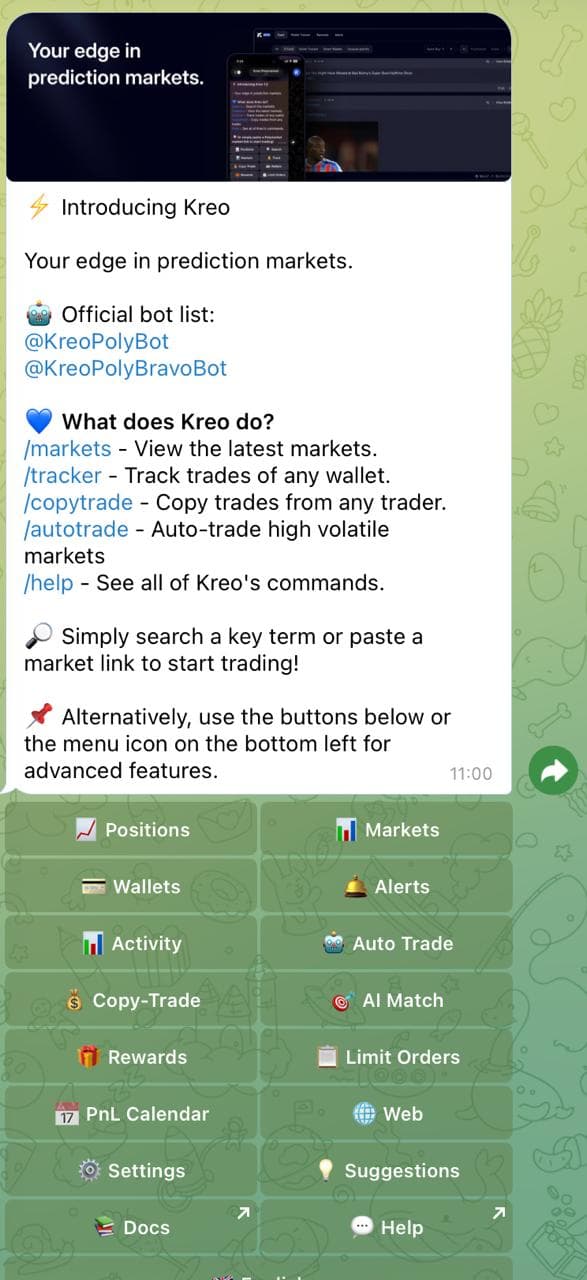
Public Kreo writeups sell it around speed and passive edge: smart-wallet tracking, quick fills, copy modes, AI discovery/scanning claims, bid-ladder context, unusual-activity alerts, and a phone-first workflow. That is the right angle, as long as the article keeps reminding readers that speed does not fix a bad wallet shortlist.
- Use it after you already have a wallet shortlist, not before.
- If the shortlist is lazy, the automation will be lazy too.
- Check the live fee screen before you leave real size running.
What Kreo does
Kreo is a Telegram-native Polymarket and Kalshi copy-trading bot. Think of it as a low-friction layer for wallet tracking, copying, and managing entries from the same place where traders already watch alerts and chats.
Its stronger pitch is not that it removes work; it moves the repetitive work into Telegram. You still have to choose wallets, check whether their edge is recent, decide sizing, and watch whether fills are worse than the original wallet. Kreo is attractive when you want passive execution after that work is done.
- Claimed controls include fixed amount, exact mirror, percentage-based, and portfolio-weighted sizing.
- Other claimed controls include category filters, per-market caps, daily caps, slippage controls, stop loss, take profit, trailing-stop style risk management, bid-ladder visibility, and unusual activity alerts.
Fees, public signals, and field notes
Kreo public fee material lists a formula: max(0.003, 0.07 × price × (1 − price)) per trade, while other premium details may be shown inside the bot. Telegram page showed about 26,896 monthly users when checked. Third-party pages from CoinCodeCap, pm.wiki, and PolymarketBots exist, but directory ratings are thin and should not be treated as proof of profitability.
CoinCodeCap and PolymarketBots mention Kreo, but the strongest practical evidence is still feature documentation plus small-size testing.
How I would use Kreo with Predicts.guru
Use Predicts.guru to build the wallet shortlist first. Then use Kreo for automation only after you understand the wallet's categories, average position size, recent performance, and drawdowns. Telegram convenience is the reward for doing the research, not a replacement for it.
The clean Kreo workflow is: find two or three wallets, reject the ones with one-off lottery wins, set conservative copy sizing, watch the bid ladder/spread before big markets, and turn off copying if the wallet starts trading a category you do not understand.
- Start with a wallet or market thesis on Predicts.guru.
- Check recent PnL, ROI, trade count, position size, liquidity, and whether the price already moved.
- Only then open the bot/tool and start with small sizing.
Kreo's main danger is comfort. Once copying feels passive, it is easy to stop checking whether the wallet still deserves to be followed.
- Passive automation can make weak wallet selection feel safer than it is.
- Fee details appear in multiple places; confirm current pricing inside the bot.
- Kalshi and Polymarket availability depends on user location and platform rules.
Kreo is convenient after wallet research. If you skip that research, it only automates weak decisions.
Before using Kreo, check the wallets you plan to copy and the live fee screen.
Is Kreo worth using?
Kreo is worth testing if you already keep a shortlist of wallets and want a more passive Telegram flow. It is not the right starting point if you have not checked whether those wallets still trade well.
What should I check before using Kreo?
Check custody, fees, withdrawal flow, permissions, slippage, market liquidity, and whether the wallet or strategy you want to follow has repeatable performance.
The Kreo link may include a referral code. The review is still written around wallet quality, fill risk, and current fee checks.
Check these official Polymarket sources before you act on referral terms, deposit methods, fees, availability, verification, or resolution details.
Last verified: May 20, 2026
Open Kreo only after choosing wallets you have already checked.
Verify wallet PnL, ROI, activity, and market history before copying or automating trades.
Tools and related reading referenced by this guide.
Continue with nearby Polymarket research topics.
Compare Polymarket bots for copy trading, Telegram execution, sniper trades, smart-money alerts, mobile trading, terminals, and AI research workflows.
Use the Predicts.guru Polymarket wallet checker to look up trader PnL, open positions, win rate, trading history, and risk patterns.
Learn how to use Polymarket from signup to research, deposits, market selection, Yes/No shares, position tracking, and risk checks.