
Cómo depositar en Polymarket: token, red y dirección
Aprende los pasos de depósito en Polymarket: pulsa Deposit, elige método, token y red, copia la dirección, envía el mínimo y espera la confirmación.
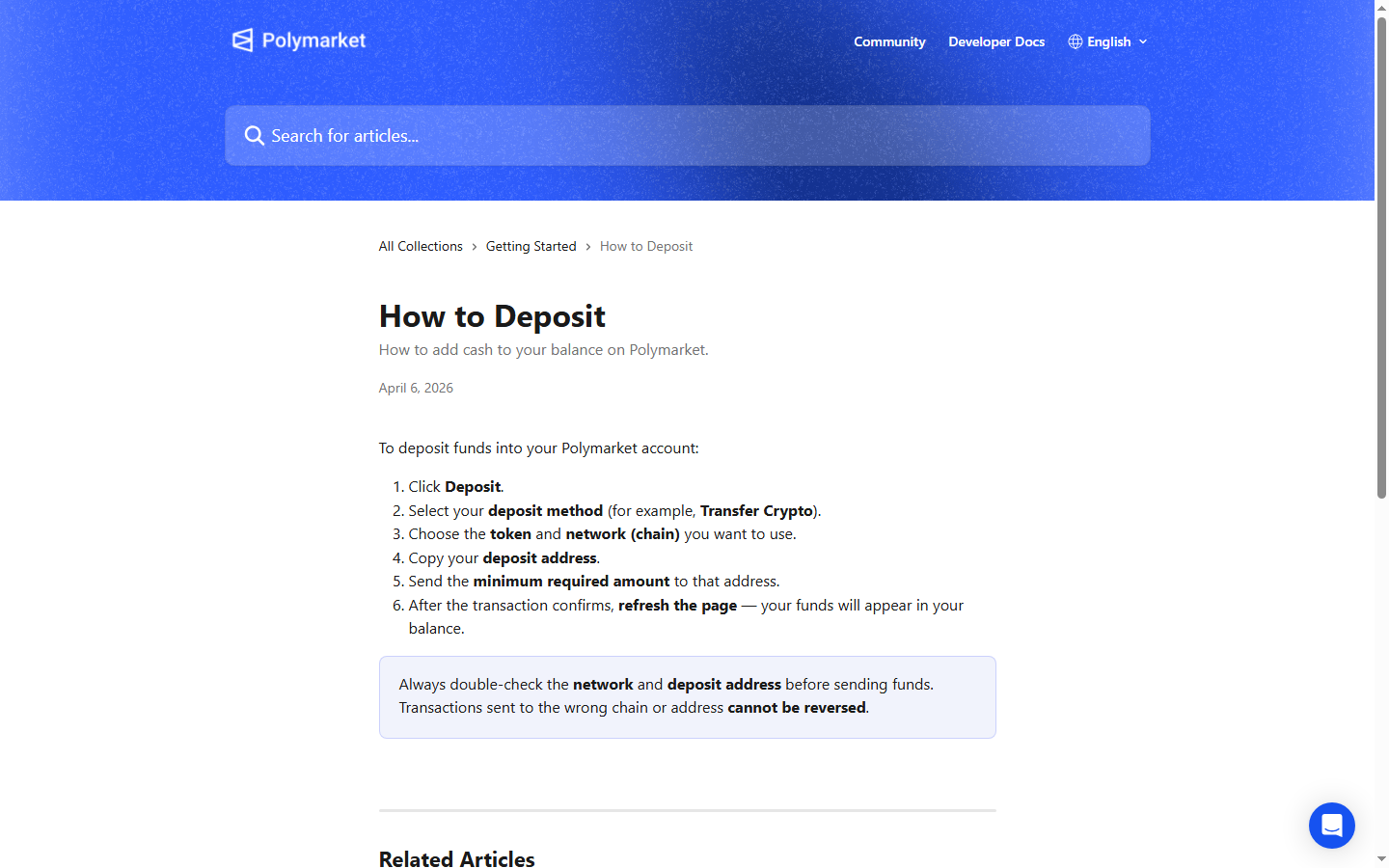
Para depositar en Polymarket, pulsa Deposit, elige el método de depósito que muestre la app, selecciona el token y la red, copia la dirección de depósito, envía al menos el importe mínimo indicado y luego recarga la página tras la confirmación. Las rutas de Coinbase, Binance, tarjeta, tarjeta de crédito, PayPal y cartera cripto dependen todas de los métodos disponibles en vivo en tu cuenta.
- Usa el método de depósito, el token, la red, la dirección y el mínimo que aparecen dentro de Polymarket.
- No reutilices una dirección antigua ni envíes por una cadena que la pantalla actual no admita.
- Espera la confirmación y recarga la página antes de dar por perdido un depósito.
Qué revisar antes de enviar fondos
Dentro de Polymarket, pulsa Deposit, elige el método disponible y usa el token, la red, la dirección y el importe mínimo que se muestran en esa pantalla. No envíes fondos a una dirección de perfil, a una dirección antigua ni a una red que hayas deducido de otra guía. Copia la dirección de depósito desde el flujo de depósito en vivo de Polymarket.
- Confirma el método de depósito, por ejemplo Transfer Crypto, antes de enviar.
- Haz coincidir el token y la cadena exactamente con la pantalla que ves.
- Envía al menos el importe mínimo requerido que indica Polymarket.
Por qué los depósitos pueden tardar
Los depósitos pueden depender de confirmaciones en la blockchain, del procesamiento del exchange o del acreditado de la plataforma. Tras la confirmación, recarga Polymarket y vuelve a revisar tu saldo. Ten a mano el hash de la transacción para poder comparar estado, token, red, importe y destino si el saldo no se actualiza.
Errores frecuentes al depositar
Entre los errores más comunes están usar la red equivocada, enviar por debajo del mínimo mostrado, enviar un token no admitido o copiar el destino equivocado. Mientras se confirman los fondos, revisa las páginas de mercados de Polymarket y prepara una lista corta de operaciones en lugar de lanzarte al primer precio visible. Revisa las reglas, el spread, el indicador de comisiones y la liquidez disponible antes de tu primera orden.
Depositar desde Coinbase
Si quieres depositar desde Coinbase, empieza dentro de Polymarket y copia la dirección de depósito en vivo solo después de elegir el token y la red actuales. Luego usa el flujo de retiro o envío de Coinbase y haz coincidir la cadena exactamente.
Revisa las comisiones de Coinbase, los mínimos de retiro, los tokens admitidos y el estado del procesamiento antes de enviar. Si la pantalla de Polymarket cambia, sigue la pantalla nueva y no un tutorial antiguo.
- Usa la dirección de la pantalla Deposit actual de Polymarket.
- Haz coincidir el token y la red antes de confirmar en Coinbase.
- Guarda el hash de la transacción de Coinbase hasta que aparezca el saldo.
Para un depósito desde Binance, usa Polymarket primero: pulsa Deposit, elige el método disponible y luego copia la dirección de depósito y la red admitida. En Binance, retira únicamente el token y la cadena que indica Polymarket.
Las pantallas de retiro de los exchanges pueden listar varias redes para el mismo token. Elegir una red más barata o más rápida que Polymarket no mostró puede enviar los fondos a la cadena equivocada.
- Compara el nombre de la red en Binance con la pantalla de Polymarket.
- Revisa las comisiones de retiro y el importe mínimo de Binance.
- No reutilices una dirección de retiro anterior de Binance sin volver a comprobar Polymarket.
Si Polymarket muestra una opción de tarjeta o tarjeta de crédito a través de un proveedor de pagos, lee las comisiones, los límites, las verificaciones de identidad, la disponibilidad por región y los tiempos de liquidación de ese proveedor antes de continuar. Fondear con tarjeta puede implicar costes del proveedor o rechazos del banco emisor que no existen en las transferencias desde una cartera cripto. Si la opción de tarjeta no aparece en tu cuenta, usa uno de los métodos que Polymarket muestra actualmente en lugar de recurrir a un atajo desconocido.
- Revisa las comisiones del proveedor antes de confirmar una compra con tarjeta.
- Comprueba si el importe llega de inmediato o después de un procesamiento.
- Aplica la misma precaución a los flujos de tarjeta de débito y de crédito.
Algunos usuarios buscan una ruta de depósito con PayPal. Considera PayPal disponible solo si el flujo de depósito en vivo de Polymarket o la pantalla actual de un proveedor de pagos lo muestra para tu cuenta.
Si PayPal está disponible, revisa el proveedor, la fuente de fondos, las comisiones, la conversión de divisa y las reglas de reembolso antes de aprobar. Si PayPal no aparece, no envíes fondos a una página de terceros que afirme poder acreditar tu saldo en Polymarket.
Un depósito desde una cartera cripto también empieza con el botón Deposit de Polymarket. Elige el token y la red, copia la dirección de depósito y luego envía desde tu cartera con fondos suficientes para la transferencia y para el coste de red.
Revisa la dirección una vez más antes de firmar en MetaMask, Rabby, Phantom u otra cartera. Las firmas y las transferencias de la cartera son acciones distintas, así que lee el mensaje antes de aprobar cualquiera de las dos.
Enviar a la dirección equivocada, a la cadena equivocada, con un token no admitido o por debajo del mínimo puede generar un problema de recuperación. Usa la pantalla actual de Polymarket como fuente de verdad.
Empieza dentro de Polymarket. Pulsa Deposit, elige el método que se muestra a tu cuenta, selecciona el token y la red, copia la dirección de depósito y revisa el mínimo indicado. Solo entonces abre el exchange, el proveedor de tarjeta o la cartera que planeas usar.
Este orden importa porque la pantalla en vivo de Polymarket decide la ruta admitida. Empezar por Coinbase, Binance, PayPal o una cartera aumenta la probabilidad de elegir una cadena o un token que Polymarket no mostró. El flujo del centro de ayuda es corto, pero lo difícil es hacer coincidir cada campo antes de enviar el dinero.
| Paso | Acción |
|---|---|
| 1 | Pulsa Deposit |
| 2 | Elige un método de depósito, como Transfer Crypto |
| 3 | Elige token y red |
| 4 | Copia la dirección de depósito |
| 5 | Envía al menos el mínimo indicado |
| 6 | Espera la confirmación y recarga la página |
Los docs del Bridge son más útiles que una frase genérica de «depositar cripto» porque muestran por qué el método puede variar según la cadena. El bridge admite varias redes, convierte los depósitos a pUSD en Polygon y aplica importes mínimos de depósito que varían según la cadena.
Usa el endpoint en vivo de activos admitidos o la pantalla actual de Polymarket antes de enviar. La tabla siguiente es una foto fija fácil de leer, no un sustituto de la ruta en vivo.
| Cadena | Tipo de dirección | Mínimo | Activos de ejemplo |
|---|---|---|---|
| Ethereum | EVM | $7 | ETH, USDC, USDT, WBTC, DAI |
| Polygon | EVM | $2 | POL, USDC, USDT, DAI, WETH |
| Arbitrum | EVM | $2 | ETH, ARB, USDC, USDT, DAI |
| Base | EVM | $2 | ETH, USDC, USDT, DAI, cbBTC |
| Optimism | EVM | $2 | ETH, OP, USDC, USDT, DAI |
| BNB Smart Chain | EVM | $2 | BNB, USDC, USDT, DAI, ETH |
| Solana | SVM | $2 | SOL, USDC, USDT, USDe |
| Bitcoin | BTC | $9 | BTC |
| Tron | TVM | $9 | USDT |
Trata el token, la red y la dirección como una sola instrucción combinada. Un token correcto en la red equivocada puede fallar igualmente. Una red correcta con una dirección antigua puede generar igualmente un caso de soporte.
Antes de enviar, compara los primeros y los últimos caracteres de la dirección, el nombre de la cadena, el símbolo del token y el importe mínimo. Guarda el hash de la transacción tras el envío. Por debajo, Polymarket usa pUSD como colateral de negociación, así que un depósito puede implicar un paso de conversión o de envoltura aunque la pantalla que ve el usuario parezca una simple recarga de saldo.
| Campo | Valor actual en los docs |
|---|---|
| Estándar del token | ERC-20 |
| Red | Polygon mainnet |
| Decimales | 6 |
| Respaldo | USDC, aplicado onchain |
| Transferible | Sí, ERC-20 estándar |
Un depósito lento es más fácil de gestionar cuando puedes nombrar el estado. Los docs de estado del Bridge separan la detección en la cadena de origen, el enrutamiento, el envío a Polygon, la finalización y el fallo. Eso te da una nota de soporte mejor que «mi saldo no se actualizó».
Para un usuario normal, la versión práctica es simple: guarda la dirección de depósito, la cadena de envío, el importe y el hash. Si la ruta sigue procesándose, espera. Si falla, reúne los datos del bridge o del proveedor antes de enviar dinero otra vez.
| Estado | Significado |
|---|---|
| DEPOSIT_DETECTED | Fondos detectados en la cadena de origen, aún sin procesar |
| PROCESSING | La transacción se está enrutando y convirtiendo |
| ORIGIN_TX_CONFIRMED | Transacción confirmada en la cadena de origen |
| SUBMITTED | Enviada a la cadena de destino, Polygon |
| COMPLETED | Los fondos llegaron |
| FAILED | La transacción encontró un error |
Los depósitos desde Coinbase y Binance suelen comportarse como retiros de exchange. Los depósitos con tarjeta y con tarjeta de crédito pueden implicar una cotización del proveedor, verificaciones de identidad, rechazos del emisor y comisiones extra. Los depósitos desde una cartera dan control directo, pero dejan la responsabilidad de la dirección y la red en tus manos.
Las búsquedas sobre PayPal deben tratarse como preguntas de disponibilidad. Si PayPal no aparece en el flujo actual de Polymarket o del proveedor, no uses un atajo de terceros que afirme poder acreditar tu saldo.
Un depósito puede depender de la aprobación del exchange, de la confirmación en la blockchain, del procesamiento del proveedor y de la actualización del saldo en Polymarket. Lento no siempre significa perdido. Confirma el estado de la transacción antes de enviar otro depósito.
Si la transferencia está confirmada en la cadena pero no aparece en la cuenta, reúne el hash de la transacción, el token, la red, el importe, la dirección de destino y la pantalla de depósito que usaste antes de contactar con soporte.
Aprovecha el tiempo de confirmación para preparar una lista corta de operaciones. Lee las reglas, compara la liquidez, revisa el spread e inspecciona la actividad reciente. Una cuenta con fondos no debería empujarte al primer mercado con un movimiento de precio llamativo.
Cuando aparezca el saldo, toma la decisión de mercado con esa misma lista de comprobación. Que el depósito funcione solo demuestra que la ruta de fondeo funcionó.
Si el método y las comisiones actuales lo permiten, una primera transferencia más pequeña puede reducir el riesgo operativo. Es útil cuando estás aprendiendo una red, una cartera o un flujo de retiro de exchange nuevos.
Una transferencia de prueba no elimina la necesidad de hacer coincidir token, red y dirección. Solo limita el daño si entendiste mal la ruta.
Guarda la dirección de depósito, la red, el token, el importe, el hash de la transacción, la plataforma de envío y la marca de tiempo. Si el depósito llegó a través de un proveedor, guarda el recibo del proveedor y cualquier ID de orden.
Soporte puede avanzar más rápido cuando aportas datos concretos de la transferencia. Una captura que solo muestra que falta el saldo es más débil que el registro de la transacción.
Consulta estas fuentes oficiales de Polymarket antes de actuar según condiciones de referidos, métodos de depósito, comisiones, disponibilidad, verificación o detalles de resolución.
Última verificación: 20 may 2026
Consulta los términos de registro actuales de Polymarket antes de crear o fondear una cuenta.
Aprovecha el tiempo de confirmación para investigar la actividad del mercado.
Herramientas y lecturas relacionadas citadas en esta guía.
Continúa con temas cercanos de investigación en Polymarket.
Soluciona un depósito de Polymarket que no aparece revisando el hash de la transacción, el token, la red, el monto mínimo y la dirección de depósito.
Entiende las comisiones de Polymarket: comisiones de taker en algunos mercados, categorías sin comisión, notas de depósito y retiro, spreads y liquidez.
Aprende a usar Polymarket: registro, investigación, depósitos, elección de mercados, acciones Sí/No, seguimiento de posiciones y control de riesgo.