
El depósito en Polymarket no aparece: revisiones antes de enviar más
Soluciona un depósito de Polymarket que no aparece revisando el hash de la transacción, el token, la red, el monto mínimo y la dirección de depósito.
Si tu depósito en Polymarket no aparece, revisa si la transacción se completó en un explorador de bloques y luego compara token, red, monto y destino con los datos vigentes de Deposit -> Transfer Crypto. Si está confirmada on-chain pero falta en tu saldo, actualiza la página o vuelve a iniciar sesión antes de contactar al soporte de Polymarket con el hash de la transacción.
- Empieza por el hash de la transacción, el token, la red y la dirección de destino.
- No envíes un segundo depósito solo porque el primero va lento.
- Si la transferencia está confirmada pero falta, prepara el hash de la transacción para el soporte.
Primeras revisiones
Busca el hash de la transacción y confirma que la transferencia se completó en el explorador correcto. Después compara token, red, monto y destino con los datos de depósito que usaste. Si retiraste desde un exchange, revisa si el exchange realmente transmitió la transacción y si el monto alcanzó el mínimo que muestra Polymarket.
- Usa Polygonscan, Etherscan o el explorador correspondiente a la red que utilizaste.
- Revisa si usaste Deposit -> Transfer Crypto o si enviaste a la dirección de tu perfil.
- Actualiza Polymarket e inicia sesión de nuevo antes de abrir un ticket de soporte.
Por qué un depósito puede retrasarse
Una transferencia puede retrasarse por congestión de la red, revisión del exchange o acreditación de la plataforma. El siguiente paso correcto depende de dónde se encuentra la transacción en este momento. Evita enviar otra transferencia hasta entender si la primera está pendiente, falló o se envió al destino equivocado.
Cuándo contactar al soporte
Si la transacción está confirmada on-chain pero sigue faltando después de actualizar la página o iniciar sesión de nuevo, contacta al soporte de Polymarket con el hash de la transacción, el token, el monto y la red. Mientras esperas, revisa las reglas del mercado y la liquidez para que el retraso no se convierta en una operación apresurada.
Empieza por el hash de la transacción y la pantalla exacta de depósito que usaste. Confirma la cadena, el token, el monto, el destinatario y el estado en el explorador o en la página de retiros del exchange.
Un saldo faltante puede deberse a un retiro pendiente en el exchange, a una confirmación lenta en la blockchain, a una transferencia por debajo del mínimo o a un destino equivocado. Cada caso necesita una solución distinta.
Si Coinbase o Binance no transmitió el retiro, Polymarket todavía no puede acreditarlo. Revisa primero el estado del retiro en el exchange. Si el exchange muestra un hash, pasa al explorador y compara el destino con la dirección de depósito de Polymarket.
Las transferencias desde carteras fallan de distintas maneras. La cartera puede usar la red equivocada, enviar un token no compatible o firmar una transacción hacia una dirección copiada de la pantalla equivocada.
Prepara el hash de la transacción, la plataforma de envío, el token, la red, el monto, la marca de tiempo, la dirección del destinatario y una captura del método de depósito de Polymarket que seleccionaste. Incluye el correo de la cuenta o el identificador de la cartera si el soporte lo pide.
No envíes un segundo depósito para demostrar que el primero funcionó. Resuelve primero la transferencia inicial, sobre todo si el problema puede ser de cadena o dirección equivocada.
Espera hasta saber si la primera transferencia está pendiente, falló, se confirmó al lugar equivocado o se confirmó a la dirección correcta de Polymarket. Enviar de nuevo puede duplicar el mismo error. Si necesitas probar una ruta corregida, usa el monto más pequeño que permita la pantalla de depósito actual y mantén el registro de la nueva transacción separado del primer caso.
Pendiente en un exchange significa que el exchange todavía controla la transferencia. Transmitida con un hash significa que la blockchain ya tiene un registro. Confirmada a la dirección correcta significa que puedes comparar la pantalla de saldo de Polymarket con el resultado del explorador.
Esos tres estados responden preguntas distintas. Una solicitud de soporte con solo una captura de la página de saldo obliga al soporte a pedir datos básicos de la transacción. Una solicitud con el hash y la red les da un punto de partida real.
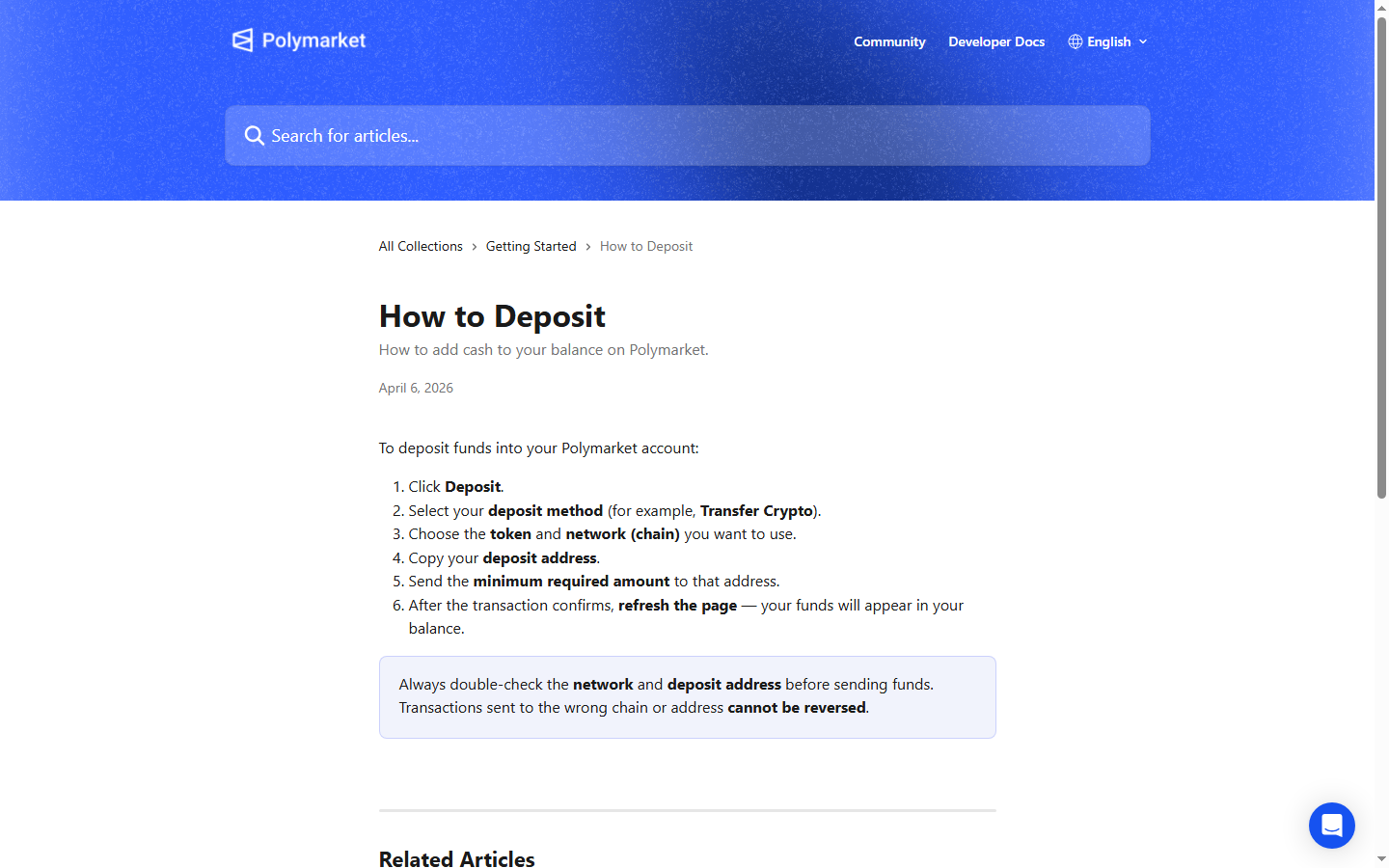
Compara el símbolo del token, el nombre de la cadena, la dirección del destinatario y el monto con la pantalla de depósito vigente. La guía de depósitos de Polymarket indica a los usuarios elegir token y red, copiar la dirección de depósito y enviar al menos el mínimo mostrado.
Un token correcto en la cadena equivocada igual puede generar un caso de depósito faltante. Una cadena correcta con el destinatario equivocado crea un problema distinto. Trata cada campo como una revisión propia.
En el explorador, confirma el estado de la transacción, el remitente, el destinatario, el contrato del token y la marca de tiempo. Si el explorador no muestra ninguna transacción, vuelve al exchange o a la cartera, porque Polymarket todavía no tiene nada que acreditar.
Si el explorador confirma la transferencia a la dirección exacta de depósito, actualiza la página de Polymarket y espera el retraso normal de indexación antes de escalar. Anota la hora en que actualizaste para que tus notas sean precisas.
Algunos métodos de depósito usan una cotización intermediaria o un flujo de pago. En ese caso, guarda el comprobante del proveedor, el ID de la cotización, la comisión, el método de pago y cualquier referencia de transacción que te dé el proveedor.
El proveedor puede haber aceptado el pago antes de enviar los fondos on-chain o antes de que Polymarket actualice el saldo. Tu comprobante ayuda a separar el retraso del proveedor del retraso de confirmación de la blockchain.
Un depósito retrasado suele ocurrir cuando el mercado que querías se está moviendo. Resiste el impulso de rearmar el plan desde el pánico. Una entrada peor puede convertir un problema de soporte de depósito en una mala operación.
Mientras se acreditan los fondos, usa la página del evento, el feed de actividad y los datos de carteras para decidir si el mercado original todavía merece capital al nuevo precio.
Consulta estas fuentes oficiales de Polymarket antes de actuar según condiciones de referidos, métodos de depósito, comisiones, disponibilidad, verificación o detalles de resolución.
Última verificación: 20 may 2026
Investiga mercados mientras se actualiza el estado de tu transferencia.
Compara historiales de traders antes de abrir una posición.
Herramientas y lecturas relacionadas citadas en esta guía.
Continúa con temas cercanos de investigación en Polymarket.
Aprende los pasos de depósito en Polymarket: pulsa Deposit, elige método, token y red, copia la dirección, envía el mínimo y espera la confirmación.
Entiende las comisiones de Polymarket: comisiones de taker en algunos mercados, categorías sin comisión, notas de depósito y retiro, spreads y liquidez.
Aprende a usar Polymarket: registro, investigación, depósitos, elección de mercados, acciones Sí/No, seguimiento de posiciones y control de riesgo.