
Polymarket Sign Up Guide: Create an Account and Research First
Create a Polymarket account with Google, email, or a wallet, then review eligibility, funding, market rules, and research steps before trading.
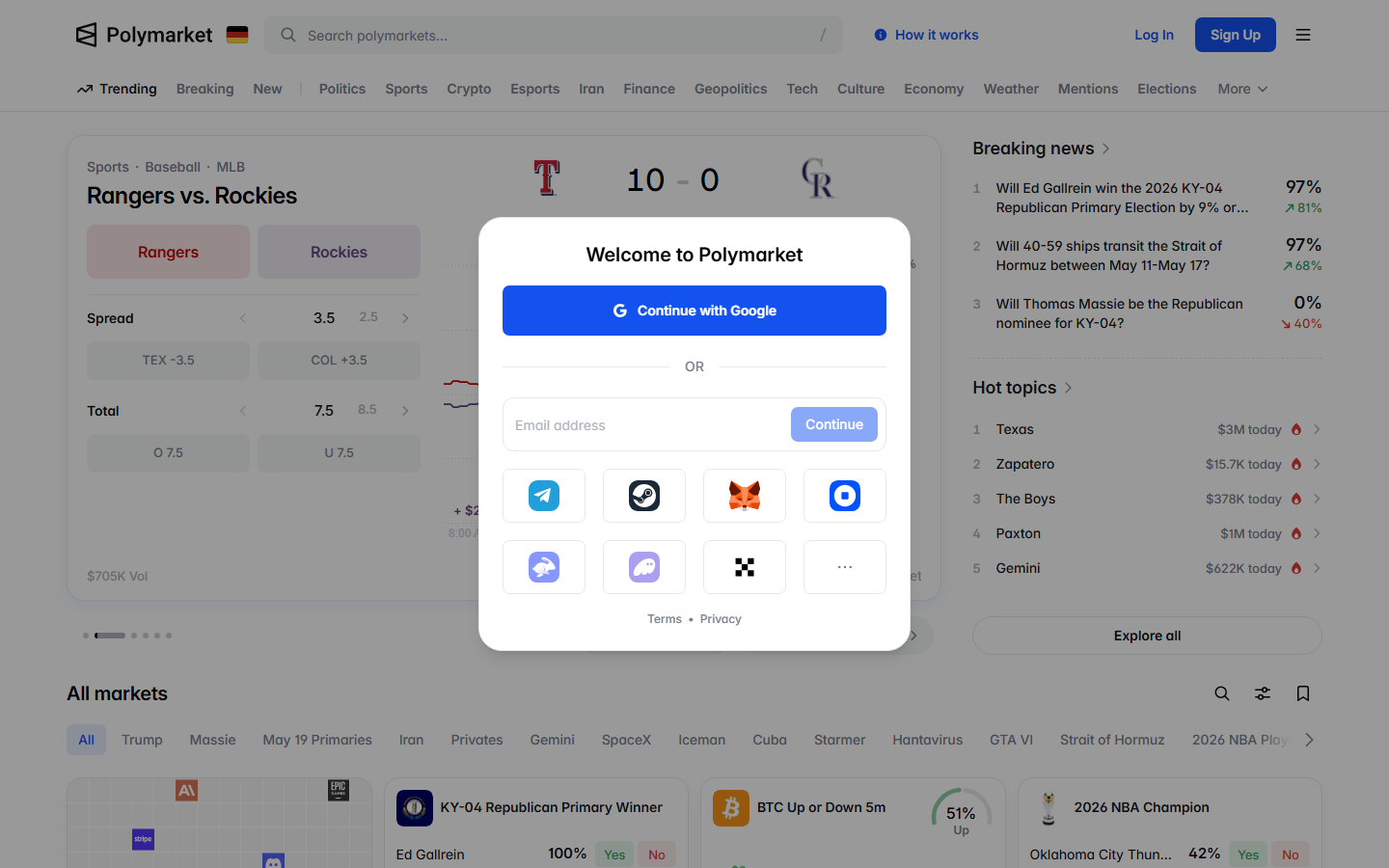
To sign up for Polymarket, click Sign Up and choose the current option that fits you: Google, email, or a supported crypto wallet. Review availability and terms first. If you sign up by email, protect the 6-digit login code; if you use a wallet, expect message signatures to connect the wallet and enable trading.
- Polymarket currently supports signup with Google, email, and crypto wallet options.
- Never share an email login code or wallet-signature prompt with anyone.
- Research markets and trader activity before depositing or buying Yes/No shares.
Before you create an account
Confirm the service is available where you are and read the current terms. Do this before you choose a funding method or follow a referral link. Decide which markets you want to research because account creation is only the first step.
How the signup flow works
Open Polymarket, click Sign Up, then choose Google, email, or a supported crypto wallet if those options are available on the live screen.
Email signup uses a 6-digit login code. Wallet signup can ask you to sign messages to connect the wallet and enable trading. Read each prompt before you approve it. The Help Center also warns email users not to share the 6-digit login code, including with people claiming to be Polymarket staff.
| Method | What the flow asks you to do |
|---|---|
| Click Sign Up, continue with Google, connect the Google account | |
| Enter email, then enter the 6-digit login code | |
| Crypto wallet | Connect a wallet such as MetaMask, Rabby, or Phantom, then sign messages |
- Google signup connects your Google account.
- Email signup depends on the code sent to your inbox.
- Wallet signup can use wallets such as MetaMask, Rabby, or Phantom when available.
What to research after signup
Open Polymarket market pages and read the event rules, price, liquidity, and trade ticket before funding the account. You can also use Predicts.guru to compare active events, top traders, wallet performance, and market movement before your first trade. This is useful after signup because market selection matters more than the account method.
Polymarket signup can offer Google, email, and wallet-based entry points depending on the current product screen. Pick the method you can secure and recover. Do not choose a wallet path only because another guide says it is more crypto-native.
Account creation is separate from trading eligibility. A signup screen may let you create or access an account while deposit, trade, or withdrawal features still depend on location and account checks.
Google login depends on your Google account security. Email login depends on protecting the one-time code. Wallet login depends on reading signatures and keeping the wallet seed phrase private. Each path has a different failure mode.
Never share an email code, seed phrase, private key, or wallet recovery phrase. If a page asks for those details, leave the flow and return to the official Polymarket site.
Check region messages before you fund. Availability can affect whether you can deposit, open trades, close positions, or withdraw. A guide written for one region may not match your account screen.
If Polymarket shows a restriction, do not use a VPN or routing workaround. Use the official restrictions page and compare permitted alternatives instead.
Save the signup method you used, the email connected to the account, the wallet address if you connected one, and any region or verification prompt shown during onboarding. These details matter if you later troubleshoot deposits or withdrawals.
Also save referral or promo terms if you used a link. The offer you saw at signup can be hard to reconstruct after the account exists.
After signup, do not trade from the homepage alone. Pick one market, read the resolution rules, check the bid and ask, inspect recent activity, and compare wallets that traded the same event.
This workflow teaches how Polymarket works before money is at risk. It also helps you notice thin markets, unclear rules, and top-wallet activity that may change your first trade idea.
Wallet signup can ask you to sign messages for connection or trading enablement. A signature is not the same as sending funds, but you still need to read it. Confirm the domain, wallet address, and action before approving.
If a prompt asks for seed phrases or recovery words, it is not a normal wallet signature. Close the page and return to the official site.
Email-code issues usually start with stale codes, wrong inboxes, spam filtering, or copying extra spaces. Wallet issues usually start with the wrong wallet account selected, unsupported wallet state, or a rejected signature.
Do not solve signup trouble by creating multiple accounts in a rush. First identify the method, browser, wallet address, email, and exact message shown on the screen.
Before depositing, create a watchlist of markets you understand. Include the market question, resolution source, current price, spread, volume, and why you think the market may be mispriced.
A watchlist turns signup into research. It also prevents the common mistake of funding an account and then choosing a market only because it appears near the top of the homepage.
Use a browser profile you control, a password-protected email account, and a wallet you understand. Browser extensions can read pages and wallet prompts, so remove extensions you do not trust before connecting a wallet.
If you use a shared machine, do not leave the account session open. A clean signup flow still depends on basic account hygiene after you close the page.
Signup success does not mean you should deposit immediately. Check availability, account prompts, funding methods, and withdrawal path first. Then decide whether you have a market shortlist worth funding.
If your first watchlist contains only vague markets or crowded trades, wait. The account will still be there after you find a better setup.
New users often skip market rules, ignore spread, follow a top wallet without checking entry price, or confuse displayed probability with the exact price they will receive. Use the first session for orientation. Open a market page, read the rules, inspect activity, and compare a few wallets before placing any order.
Account prompts can change after signup, especially around funding, withdrawals, or location checks. If the platform asks for verification, read the request before adding funds or opening a position.
Do not assume that a wallet login removes account rules. A connected wallet can identify where funds come from and where they return, but the platform still controls account access and feature availability.
A clean first session ends with account access confirmed, security details saved, market research started, and no rushed trade. That is a better outcome than signing up and buying a random market within two minutes.
Use the first session to learn the interface: portfolio, deposit, market page, activity, rules, and order ticket. Trade later when the process feels predictable and you can explain the market outcome in plain English before entry, sizing, exit, resolution, payout, and support questions if something breaks.
Check these official Polymarket sources before you act on referral terms, deposit methods, fees, availability, verification, or resolution details.
Last verified: May 20, 2026
Check the current Polymarket signup terms before you create or fund an account.
Research live Polymarket events before funding.
Tools and related reading referenced by this guide.
Continue with nearby Polymarket research topics.
Learn how Polymarket referral links work, what new users should check before signing up, and how to research markets and traders on Predicts.guru first.
Learn Polymarket's current deposit steps: click Deposit, choose method, token, network, copy the address, send the minimum, and wait for confirmation.
Learn how to use Polymarket from signup to research, deposits, market selection, Yes/No shares, position tracking, and risk checks.